FractalAI: Generating Infinity in the Browser
FractalAI: Generating Infinity in the BrowserFractalAI is a browser-based fractal generator built entirely with AI. This post explores what happens when you step away from the code, and how the modern browser can render infinite fractals directly in the browser window.
Why I Built FractalAI
Although AI has been a concept that has been discussed for the past 80 years (Thanks to Alan Turing, and many others), it’s only in the past 5 to 10 years that it has become vastly more powerful. It is currently the hot topic in pretty much every industry on the planet! Software development in particular has already changed drastically, with new tools and AI Models popping up every week. You only have to look at the Stack Overflow Developer Survey 2025 to see how common its usage is in Software development:
- 84% of developers are using or planning to use AI
- 51% of professional developers use it daily
- 61% of professional developers look at it favourably
- 35% of developers visit Stack Overflow due to AI-related issues
So like it or not, AI is here, and it is here to stay. So to keep up with "the pack” it’s probably a good idea to start learning how to use it, (and more importantly) where to be cautious!
The Constraint: 100% AI-Generated Code
To get to grips with AI and its current limits, I decided to set myself a task: build a new hobby project using only AI. All code, all functionality, and even all the design would be generated by me prompting the AI to tweak and generate the frontend code. This is an excellent way to see how AI handles CSS and general usability. For this, I use an AI Tool called Cursor. There are many tools available, but since subscribing to their pro plan, I’ve seen no real reason to change. Some of the key advantages I see over other AI tools are:
- Project-wide context awareness: Cursor understands the entire codebase rather than a single file, which leads to more accurate suggestions and safer large-scale changes across interconnected systems.
- Multi-file editing and refactoring: Cursor can apply consistent updates across multiple files in one action, making large refactors and cross-cutting changes significantly more efficient.
- AI-driven workflows: Cursor acts as an AI agent that can plan and execute multistep development tasks rather than just offering inline code suggestions.
- Context-aware integrated chat: Cursor’s built-in chat has full awareness of the repository and can directly modify code, reducing the need for manual context sharing.
- Model flexibility: Cursor allows developers to switch between different AI models, enabling optimisation for performance, cost, or task-specific quality.
- Optimised for complex systems: Cursor performs particularly well in large and complex codebases where deeper reasoning and architectural understanding are required.
- Faster end-to-end task completion: Cursor often reduces overall development time by completing entire tasks in fewer steps, even if individual code suggestions are not the fastest.
- AI-native IDE design: Cursor is built from the ground up as an AI-first environment, enabling tighter integration and more advanced workflows than plugin-based alternatives.
FYI: I’m not sponsored by Cursor, I just love how clean and simple it is too pickup and use! There are many others on the web that you can choose instead!
What FractalAI Actually Does
Well, as you may have guessed already from the name of the blog post, the project I chose to build what a fractal generator 100% built on modern browser technology. The code is all open-source and free for anyone to clone, modify and use as they wish! The code repository is on GitHub here.
The project currently comes with the following features:
- Fractal Selection: Choose from 100+ fractal types via dropdown menu.
- Adjustable Iterations: Control detail level (10 to 400 iterations).
- 35+ Colour Schemes: Classic, Fire, Ocean, Rainbow variants, Monochrome, Forest, Sunset, Purple, Cyan, Gold, Ice, Neon, Cosmic, Aurora, Coral, Autumn, Midnight, Emerald, Rose Gold, Electric, Vintage, Tropical, Galaxy, Lava, Arctic, Sakura, Volcanic, Mint, Sunrise, Steel, Prism, Mystic, Amber, and more.
- Zoom and Pan: Click and drag to pan, scroll or double-click to zoom.
- Real-time Parameter Adjustment: Adjust Julia set constants, scales, and other parameters in real-time.
- Screenshot Capture: Save current view as PNG with EXIF metadata.
- FPS Monitoring: Real-time frame rate display.
- Coordinate Display: View and copy exact fractal coordinates.
- Presets System: Quick-load pre-configured fractal views.
- Favourites System: Save and manage favourite fractal configurations.
- Share & URL State: Share fractals via URL with encoded state.
This was just a copy / paste from the README.md file in the repository, it actually comes with more features that you can read about like Machine Learning-Powered Discovery, Performance Optimizations, and Advanced Features.
I’ve been fascinated with Fractals for many years, I actually dabbled with fractal generation and Web Workers back in January 2010, scarily that’s a whole 16-years ago! That makes me feel very 👴!
The reason fractals have always fascinated me is perfectly summed up in this quote from the godfather of fractals Benoît Mandelbrot:
Bottomless wonders spring from simple rules, which are repeated without end.
I find it simply astounding that a whole infinite world can be rendered by a computer using such "simple" mathematics. For example, the iconic Mandelbrot fractal is all generated via this neat little formula:
Where:
(a complex number)
A point
Which generates this absolutely stunning image that you can literally zoom in to forever!

The image above really doesn’t do the details of the Mandelbrot justice! So why not take a look around the original setting I used to render it here.
Why the Browser Is Surprisingly Good at Rendering Fractals
What makes the browser surprisingly good at rendering fractals is not just raw capability, but accessibility and reach. A fractal renderer written in the browser can run anywhere instantly with no installation, no setup, and no platform constraints. That is a powerful starting point. Additionaly there's JavaScript, as the language behind this project, it is embedded in every modern browser, making it one of the most widely available execution environments in the world.
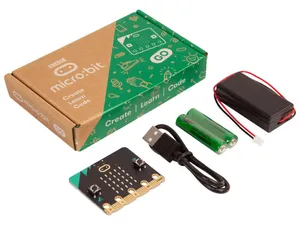
This accessibility isn't theoretical, it shows up in everyday life. Just last month, while walking my 8-year-old son home from primary school, he told me about what he had been learning in "Coding Club" using his BBC micro:bit. He was genuinely excited when he said:
Daddy, I’ve been learning all about something called JavaScript!
That moment really highlighted the scale of JavaScript’s reach. It is not just a professional tool, it is something being introduced at a very young age. When I explained that it forms a large part of my own work, it reinforced how deeply embedded it is in both education and industry.
It is remarkable to think that a language first created by Brendan Eich in just 10-days has evolved into a platform capable of driving complex visualisations like fractal rendering!
This, combined with modern browser features such as high-performance JavaScript engines, GPU acceleration through WebGL, and efficient canvas APIs, the browser has become an unexpectedly capable environment for this kind of computationally intensive work.
AI as a Design Partner, Not Just a Tool
I’ve found that AI is most powerful when it is treated as a design partner rather than just a tool for generating code. While it is clearly effective at implementation, its real strength lies in collaboration. You can ask it to plan a feature, and it will respond with probing questions that help clarify intent, constraints, and direction. Those questions are not incidental, they are often the key to shaping a better outcome, giving you the opportunity to guide and refine the approach early in a project.
Because of the breadth of knowledge it draws on, the interaction feels less like issuing instructions and more like a back and forth design "conversation". It becomes a space for exploring ideas, testing assumptions, and iterating quickly before committing to an ideal solution.
This became particularly valuable in areas where I would not usually feel confident, such as design. Rather than treating that as a limitation, I leaned into AI to generate an initial direction. From there, my role shifted to refinement. Once a baseline design was in place, I could make targeted adjustments to the CSS and HTML, either through follow-up prompts or by working directly with insights gathered from the Browser DevTools.
Although I had originally set myself the constraint of not writing any code, I found that introducing precise, real-world context from DevTools significantly improved the quality of the AI’s output (more on this later in the post). By feeding in specific observations rather than abstract instructions, the responses became more relevant, more predictable, and easier to iterate on.
This is where AI moves beyond being a simple tool. It becomes a collaborator that helps shape both the design thinking and the implementation, with you firmly guiding the direction at each step.
The Architecture (Without Writing Code Myself)
This was easily the most engaging part of the process and where the most learning happened. Having the freedom to choose technologies and then observe how AI composes them into a coherent architecture is genuinely insightful, especially when you examine the reasoning behind those decisions.
When you are unsure whether a technology is a good fit for a project, you can quickly create a "throwaway" prototype and evaluate it. That shifts the role of AI from a coding assistant to a decision support tool. You are not just generating output, you are generating evidence.
Over time, this creates a feedback loop where each experiment improves your judgement. You learn what works, what to avoid, and why.
This aligns closely with core Agile principles:
- Fail early to surface risk
- Iterate quickly to explore options
- Learn continuously to improve decisions
If you use AI for anything, use it to accelerate learning. Speed only matters when it leads to better decisions.
Machine Learning Inside the Browser
For many years, I’d wanted to have a play with machine learning (ML), but had never really had the opportunity. With the arrival of browser-based libraries like TensorFlow.js, the idea of running ML directly in the browser suddenly became far more accessible.
In this project, I saw an interesting opportunity to apply it to the “random fractal position” feature. The goal was simple on the surface. A user selects a fractal and a colour scheme, presses a button, and gets a random set of x, y, and z values to explore.
In practice, it was not that simple.
When the AI first implemented this in plain JavaScript, I ran into a fundamental problem. A large proportion of fractal space is effectively empty, which meant most “random” positions resulted in a blank or uninteresting visual. I initially tried constraining the co-ordinates to specific regions, but with over 100 fractals available, this quickly became unmanageable.
So I started thinking differently. Instead of hard-coding “good” regions, what if the system could learn what a good fractal view looks like?
That is where machine learning came in. The idea was to train a lightweight model to recognise visually interesting outputs, effectively teaching the random feature to make better choices over time. Using AI to help generate and iterate on this approach made the experimentation surprisingly fast.
Originally, I explored using TensorFlow.js, but it turned out to be far too heavy for this use case. Even compressed, it added around 450 KB of JavaScript, which is significant given the existing bundle size for all the fractal rendering functionality.
Instead, I opted for Synaptic. It is much smaller at around 45 KB when Brotli compressed, and while it has not seen recent updates, it proved more than capable for what I needed. It also keeps the overall performance profile of the application in check, which was a key consideration.
If required, this approach leaves the door open to swap Synaptic out for a more modern ML library in the future. But for now, it demonstrates something powerful. You can run meaningful machine learning directly in the browser, and use it to enhance user experience in ways that would be difficult to achieve with traditional logic alone.
As mentioned in the README.md file in the GitHub repository it is used for the following functionality:
- ML-Based Scoring: Uses Synaptic.js neural network to score fractal configurations.
- Hybrid Algorithm: Combines fast heuristic screening with ML refinement.
- Personalised Learning: Trains on your favourites to learn your preferences.
- "Surprise Me" Feature: Discover interesting new fractal zooms automatically.
- Background Training: Model retrains automatically as you add favourites.
- Local Storage: ML model and favourites persist in browser storage.
Note: You will find all of this functionality in the “Full-screen view” of the fractal viewer. The standard UI was starting to feel quite crowded, so that ended up being the most sensible place for it.
What Worked Surprisingly Well
Planning
Planning from the AI was excellent. This may be a Cursor-specific feature, but the follow-up questions it asked about how I wanted to approach a problem were a really nice touch. When you are unsure which direction the AI will take, this gives you useful insights early on.
Crafted Prompts
Top AI Tip: Detailed prompts made a huge difference. The more specific I was, the more reliable the output became. In some cases, I even included images or copied exact code from DevTools just to make sure the AI fully understood the context.
I really liked how Anthony Alicea explains AI in his Understanding AI-Assisted Software Development course. He visualises the AI “brain” as a cube, where each smaller blue cube represents a piece of knowledge the AI has learned. It’s a simple idea, but it makes how AI works much easier to grasp.
A visualisation from his course is shown below:

This “knowledge” could include things like:
- Documents
- Images
- External data
- Specifications
- Examples
- Instructions
Your job when prompting the AI is to “sail” across this ocean of knowledge and get to a favourable output on the opposite side. To get better results, you need to give the AI waypoints or "lighthouses" to direct the AI through this ocean of knowledge, your prompts are these "lighthouses". That way, you guide the path it takes, rather than leaving it to figure one out on its own.
So rather than saying:
Build me a website that renders fractals
Be more specific:
Build me a website that renders fractals. Start with a simple Mandelbrot set and use the Canvas API to draw it. I’d also like you to leverage the WebGL API in the visualisation. Make sure the code is well documented and uses modern linting tools like Stylelint and ESLint to keep it maintainable. I also want to use Vite as the local development server…
Now, you might be thinking, that’s a long prompt! It is. But if you want reliable output, you need to give the AI clear instructions to follow. Otherwise, it will just “set sail” across that vast corpus of information and produce something unfocused because it has too much freedom.
If there’s one thing I learned from this project, it’s this: spend time crafting detailed prompts. That’s how you steer the ship across the ocean of information and actually reach the result you want.
Rules
Another useful thing I learned is that you can give the AI a consistent set of rules to follow across every prompt. In Cursor, these live in the .cursor/rules directory in your repository.
In the FractalAI project, I ended up with four sets of rules:
The AI refers to these rules for every prompt, giving it consistent context and guidance. You might notice they look AI-generated, and you’d be right. It’s a bit meta, but I asked Cursor to write the rules it would follow in future prompts.
The thinking behind this was simple: it is far more likely to understand its own instructions than my rambling ones!
I’m not sure if this is specific to Cursor, or if other AIs follow a similar approach. It would be great to see some standardisation here to allow these rules to be portable across multiple AI tools in the future.
If this is already happening, I’d love to know. Please feel free to let me know if you have any information!
Writing Tests
If you are not a fan of writing tests, even though you know you should, AI helps a lot. If it can write the code, it can just as easily write the tests too.
Where a human developer might get tired of writing tests, AI doesn't. That makes it much easier to push towards high coverage and keep things consistent.
And if you enjoy that warm feeling of seeing a wall of green in your terminal's test output, this definitely helps. I’m one of those people:
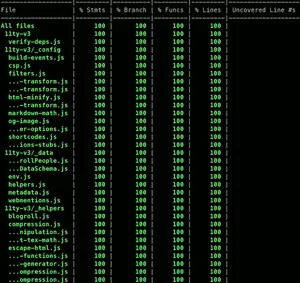
Can you imagine how long it would take to get 100% coverage across all files, Statements, Branches, Functions, and Lines? That's a lot of work for one (obsessive) person.
Or, a perfect job for AI!
Refactoring
Where AI really excelled in this project was its ability to understand even the smallest details of the codebase. That makes refactoring fast and almost effortless.
For example, I initially used TensorFlow.js, but quickly realised it was too heavy and overly complex for what I needed. So I gave a simple prompt:
Could you swap out TensorFlow.js and use Synaptic instead? The page weight is too high and it’s more complex than required.
The important part here is the added context. By explaining why I wanted the change, I was building up the AI’s understanding of the project.
From just that, it learns that I care about performance and keeping things lightweight, which leads to better, more aligned outputs as the project progresses.
If you combine AI’s ability to refactor quickly with version control like Git, you are onto a winning combination.
You can easily branch and tag different versions of your project to experiment with alternative approaches or technologies. If a refactor does not work out, just roll back to a previous commit, or simply scrap the branch / tag.
One thing to watch out for if you do this is be wary of your node_modules folder. Projects tend to get a bit cranky if the dependencies are not installed correctly. And no, committing node_modules to your repo is not the answer! 🤮
An added bonus when using this technique is if you have good test coverage, you can swap out a technology and quickly run your tests to see what has broken. It makes validating a refactor fast and far less risky.
This is where AI and testing really come into their own. The AI can make sweeping changes, and your tests act as the safety net to catch anything that breaks.
Proof of concepts
At the start of my career in digital marketing, there was a familiar pattern. Most of the budget went on UX and design. By the time it reached the build phase, you would give an estimate and hear, “We don’t have the budget for that.”
Classic waterfall. Siloed teams. And not much left for actually building "the thing".
There was even a running joke that what we really needed was a big “build it” button, so the technology part cost next to nothing.
When it comes to proof of concepts, or spikes as some call them, you are essentially writing throwaway code. This is where that “build it” button starts to feel real.
With a bit of direction on the tech stack and constraints, you can have AI produce a working prototype in hours, not days. Especially when dealing with unfamiliar technologies.
What I’m really saying is that AI is great for testing ideas in code. Going back to the Agile principles I mentioned earlier in the post:
- Fail early to surface risk
- Iterate quickly to explore options
- Learn continuously to improve decisions
These all map perfectly to AI-generated proof of concepts.
Word of warning: be careful using AI-generated code in live / production without proper validation. Make sure it goes through the usual checks like Pull Requests (PRs), Continuous Integration, and Deployment (CI/CD) gates.
If something goes wrong, you can't blame the AI (well you could try, but I doubt it would go down well!)
Rule of thumb: There should always be a human reviewing AI-generated code, especially when sensitive data is involved.
Making unfamiliar things make sense
I’ve touched on this a little in the previous sections, one of AI’s superpowers is being able to explain complex concepts to the user when required. This is especially true when it comes to software development and technologies a user has no experience of before. AI is basically an incredibly patient coach who is always willing to answer your questions, no mater how small or stupid they may be! When combined with a Code UI like VS Code, you are really working with a powerful workflow. Being able to highlight individual rows and blocks of code and get AI to explain exactly what is happening is a dream come true for anyone learning to code in 2026! I know I wish I had it when I was a junior developer, far to many years ago!
Another thing I found really useful is learning through optimisation. You might write a piece of code you understand, then ask the AI:
- Are there any edge cases I have missed?
- How can I make it more maintainable?
- Does this code follow best practices for the framework?
- How can I make it more performant?
- Will this code perform well if the website is scaled up?
- How can I make it easier to read for other developers?
- etc…
These kinds of questions help reinforce your understanding, especially around the less obvious parts of a language.
Building momentum
Because I’m so old, I remember when Stack Overflow first appeared back in late 2008. It was a game changer for web development and beyond. A place to ask questions and get a range of answers, some useful, some less so.
I’ve never been one to answer loads of questions, but I do try to go back and share solutions when I find them.
The downside is it breaks your flow. One minute you are productive, the next you are stuck searching for answers, sometimes for hours. And if your problem is niche and not already answered, you could be left waiting days for a response.
With AI built into your code editor, you have all that knowledge and reasoning right at your fingertips. No need to leave the comfort of your IDE or go searching the web for that one insight that leads to a “Eureka” moment.
The result of using AI in this way is simple. Higher productivity, less frustration, and faster learning.
A win all round.
Where AI Fell Short (and Needed Steering)
The definition of insanity
To quote Albert Einstein:
Insanity is doing the same thing over and over again and expecting different results.
At times, this is precisely what using AI felt like. It would get stuck on a particular solution and keep coming back to it, no matter how I rephrased the prompt or tried to steer it in a different direction. It was incredibly frustrating.
The only reliable fix was to start a new chat, which meant losing all the project context, or switch to a different model in Cursor. I usually run in “auto" mode to balance cost and capability, but switching models also meant losing that built up understanding within the AI prompt.
There may be a better way to handle this without resetting everything? Again, if you know, please let me know.
Over-engineering simple problems
If there’s one thing you don’t need to ask AI to do, it’s over engineer a solution. I saw this a lot with CSS. Even simple requirements would take longer than expected and result in far more code than needed.
Take something basic like centring a <div> across all screen sizes.
This is a real example from the Benchmark panel in the top right of the FractalAI UI:
AI output
:root {
  --center-x: 50%;
  --center-y: 50%;
  --translate-center: translate(-50%, -50%);
  --container-display: flex;
  --container-align: center;
  --container-justify: center;
}

.container {
  position: relative;
  display: var(--container-display);
  align-items: var(--container-align);
  justify-content: var(--container-justify);
  height: 100vh;
  width: 100%;
}

.container::before {
  content: "";
  position: absolute;
  inset: 0;
  background: radial-gradient(circle, rgba(0,0,0,0.05), transparent);
  pointer-events: none;
}

.centered {
  position: absolute;
  top: var(--center-y);
  left: var(--center-x);
  transform: var(--translate-center);
  display: grid;
  place-items: center;
  padding: calc(1rem + 2px);
  min-width: clamp(200px, 50%, 400px);
  aspect-ratio: 1 / 1;
  backdrop-filter: blur(8px);
  box-shadow:
    0 2px 4px rgba(0,0,0,0.1),
    0 8px 16px rgba(0,0,0,0.15);
}

@supports (height: 100dvh) {
  .container {
    height: 100dvh;
  }
}

@media (min-width: 768px) {
  .centered {
    transform: translate(calc(-50% + 2px), calc(-50% + 2px));
  }
}
Why use one way to centre a <div> when you can use three!
- Flexbox (
align-items+justify-content) - Absolute positioning (
top/left+transform) - Grid (
place-items)
Additionally, it threw in CSS variables that were never reused and @supports queries where they were not needed.
I’d expect a developer with a good grasp of modern CSS to write something more like this:
Flexbox (modern)
.container {
  display: flex;
  justify-content: center;
  align-items: center;
  height: 100vh;
}
Grid (modern)
.container {
  display: grid;
  place-items: center;
  height: 100vh;
}
Look how much more maintainable and easier to debug the simpler approach is.
This is definitely something to watch for when reviewing or generating AI code.
Confidently wrong outputs
The tricky thing with AI is how convincing it sounds. Even when it's wrong.
I did not see this much in this project, but I ran into it when I worked for Government Digital Service (GDS). I asked Google Gemini for an overview of the changes from WCAG 2.1 to WCAG 2.2. The response sounded accurate, at least from my perspective as someone who understands the basics of accessibility without being an expert.
But when I shared it with our dedicated accessibility team, it did not hold up. It was full of inaccuracies and false claims.
It is a good reminder not to take AI output at face value, especially on topics you are not deeply familiar with.
Inconsistent outputs between prompts
It’s incredible how much difference a single word in a prompt can make to the output. In this example, I asked the AI to write a test for a hypothetical login function in another project I was working on.
Prompt 1
“Write a test for a login function”
AI Output:
test('login works', () => {
  expect(login('user', 'pass')).toBe(true);
});
Prompt 2
“Write a comprehensive test for a login function”
describe('login', () => {
  it('should succeed with correct credentials', () => {
    expect(login('user', 'pass')).toBe(true);
  });

  it('should fail with incorrect password', () => {
    expect(login('user', 'wrong')).toBe(false);
  });

  it('should fail with empty input', () => {
    expect(login('', '')).toBe(false);
  });
});
Just by adding “comprehensive”, the output is vastly different.
This might seem like a negative, and it is something to be aware of, but it links back to the Crafted Prompts section earlier. Prompt 1 lacks detail, and even Prompt 2 is still pretty vague.
Neither is a great example of how to get the best from AI. It just reinforces the need to be clear and specific in what you are asking for.
One extra word. An entirely different level of quality.
Performance blind spots
For every project, I work on, web performance is a priority. I see it as the foundation of accessibility, regardless of a user’s device, connection, or location.
During this project, I noticed that unless you explicitly ask for it, performance is not a priority in AI-generated code. In some cases, fractals would not render at all.
As an example, I asked Cursor to find unoptimised code in FractalAI. It highlighted this:
For non line based fractals, ProgressiveRenderer increases iterations on each requestAnimationFrame tick and calls fractalModule.render again to recreate the draw command
This is particularly problematic for the Mandelbrot, and other fractals that are shader based. Using regl, which already calls render() on every requestAnimationFrame, this approach creates a new draw command on every frame. That is extremely inefficient for both CPU and memory.
After prompting, the issue was resolved. Thanks to my visual render tests using Playwright, I could confirm that none of the fractals broke during the optimisation. Another win for visual testing!
This is also something I can automate. As mentioned earlier, Cursor’s Rules feature can enforce performance considerations. Writing a rule for this is now high-up on my to-do list.
Forgetting earlier constraints
This is a surprisingly human like trait of AI. As prompt "conversations" go on, it starts to forget earlier constraints. You often have to repeat yourself or restate key requirements it has quietly ignored.
Over time, parts of the project context seem to drift, much like people forgetting details as time passes.
Going back to the sailing analogy in Crafted Prompts, it is as if the AI loses sight of the waypoint “lighthouses” you set earlier.
Elementary mistakes
This happened more often than I expected. For such an advanced tool, the mistakes were surprisingly basic.
I saw this when asking the AI to update outdated npm packages. A simple prompt like:
Update all npm packages in this project, and run the coverage tests to ensure nothing has broken.
In Cursor, you can see what it is “thinking”, and it frequently searched for package versions from 2023 or 2024. It was not using the latest information.
It was only when I explicitly told it the current year was 2026 did it start checking for up-to-date versions!
This is a good reminder to be explicit when you need current information, especially for dependencies, libraries, and documentation.
Performance Challenges in the Browser
When I first planned this side project, I was quite naïve. My initial idea was to build a 3D fractal renderer in the browser using Three.js. It didn’t take long to realise this wasn’t going to be viable. Even on an M1 MacBook, the frame rate was so low it was effectively unusable.
This is where AI proved its value again. By quickly prototyping the idea, it became obvious in the first iteration that 3D rendering wasn’t going to work. That allowed me to pivot early to a 2D approach using an entirely different WebGL library.
Without that early validation, I could easily have spent far longer trying to optimise something that fundamentally isn’t practical right now. There simply isn’t enough available CPU and GPU power in a typical machine to support real-time 3D fractal rendering in the browser at a usable level.
The key thing to understand with fractals is the sheer volume of maths involved in rendering every single pixel. Each pixel can require hundreds, sometimes thousands, of iterations before you get a final value.
So, even at a relatively modest resolution like a 1810px × 1131px image, that is over 2 million pixels to compute for that single image. Multiply that by hundreds or thousands of calculations per pixel, and you quickly see the scale of the problem.
Without highly optimised code, the browser simply does not stand a chance of keeping up. It becomes less about the idea itself and more about the limits of the hardware running it.
Looking ahead, it is hard not to think about how this changes with more advanced GPU capabilities. If compute continues to accelerate, especially with emerging technologies, calculations at this scale could eventually take milliseconds rather than seconds.
As you zoom deeper into a fractal, the cost per pixel increases. To preserve detail and avoid visual artefacts, the renderer needs to run more iterations for each pixel. Beyond a certain point, the amount of computation required makes real-time interaction impractically slow.
There is also a more fundamental limitation around numerical precision. In the browser, JavaScript numbers use IEEE-754 64-bit double precision, which eventually cannot represent the minuscule coordinate differences needed at very high magnifications.
You can push beyond this using higher precision techniques, such as BigInt-based arithmetic or “double-double” approaches, but that additional precision comes at a significant cost. Each pixel becomes even more expensive to compute, which further impacts performance.
What this all really comes down to is simple. Rendering fractals efficiently in the browser is hard.
That being said, it is one of the quickest ways to max out your CPU and GPU, turn your computer into a heater, and simultaneously watch your electricity bill shoot up!
What Building This Changed About My View of AI
When I started this project, I was sceptical about how useful AI could be for coding. I had used tools like ChatGPT and Google Gemini for research, but never properly explored the coding side.
The term “Vibe coding” didn’t help either. If anything, it put me off. After reading Vibe code is legacy code, the last thing I wanted was to introduce more legacy code into a project. I also find the term itself a bit meaningless, especially after it was named word of the year in 2025. It felt like just another buzzword that would disappear as quickly as it arrived.
We have seen this pattern before. Technologies get hyped as “the future” and then quietly fade away. Anyone remember Google Glass from 2013??
Looking at the defintion of "vibe coding":
Vibe coding is an intuitive, fast paced way of writing code where you prioritise momentum and experimentation over upfront planning, often with the help of tools
I’m pleased to say this project has thoroughly changed my perspective on AI in software development. I still dislike the term “vibe coding”, but the practice behind it is undoubtedly what I found most useful and genuinely exciting while building FractalAI.
As mentioned earlier, if you put strong guard rails in place such as mandatory human reviews for all production PRs, along with solid performance and security practices, AI becomes a genuinely valuable tool for learning and rapid prototyping.
That said, I openly admit this is an idealistic view. In reality, there will always be individuals, companies, and bad actors willing to use AI in ways that harm the web for their own gain.
When it comes to new and exciting technology on the web, it often follows the same familiar pattern. A few people find ways to exploit it for their own benefit, usually at the expense of everyone else.
As Paula Poundstone put it best:
This is why we can’t have nice things.
The Future of AI-Generated Software
If there’s one thing I know about AI-generated software, it’s that it’s not going anywhere. The AI sector is projected to reach $539 billion in 2026, up from $391 billion in 2025. That’s a 38% increase in a single year. Longer term, it’s expected to push into the multi-trillion dollar range.
Spending alone tells the story. Global AI investment hit around $1.5 trillion in 2025, and it’s still accelerating. This isn’t hype, it’s momentum.
At the same time, the risks are evolving just as quickly. A new Claude model, Mythos, from Anthropic has reportedly identified a significant number of vulnerabilities across major operating systems. Some experts believe it shows an unprecedented ability to detect and potentially exploit security weaknesses. Whether that is true or is just scaremongering remains to be seen, but it’s telling that major financial institutions have already been given early access to the model ahead of any public release.
As I’ve said, AI is here to stay. The genie is well and truly out of the bottle.
My plan is simple. Learn as much as possible over the coming months and years. This is happening whether we like it or not, so it makes far more sense to understand its potential and how it’s being used than to ignore it.
If you don’t, you can be sure others in your respective field will be. As this goes far beyond software development. AI’s reach is expanding fast, so buckle up.
Summary
This project was an experiment in what happens when you step back from writing code and let AI take the lead. FractalAI is a fully AI-generated fractal renderer running in the browser, built to explore both the potential and the limits of modern AI-assisted development.
Along the way, it became clear that AI is far more than just a code generator. When used properly, it acts as a design partner, a rapid prototyping tool, and a way to accelerate learning. But it's not perfect. It needs direction, context, and clear constraints to produce reliable results.
The browser turned out to be a surprisingly powerful platform for this kind of work, capable of rendering complex, infinite visuals while even supporting lightweight machine learning. Combined with AI, it creates a feedback loop where ideas can be tested, refined, and understood far faster than traditional approaches.
The biggest takeaway is simple. AI is not replacing developers, it is changing how we work. If you use it well, it becomes a tool for thinking, learning, and making better decisions, not just writing code faster.
Well, there we go, yet another blog post where I’ve somehow written far more than intended! If you’ve made it this far, I’m genuinely impressed. Please accept this virtual gold star as a reward: ⭐
As always, feedback and comments are very welcome. You can contact me here.
FractalAI project
Below, you can find the links to the repository and the live site:
I’m completely open and actively encourage raising PR's and sending me feedback / issues about the project (with, or without AI!).
Post changelog:
- 21/04/26: Initial post published.